Built from your photos
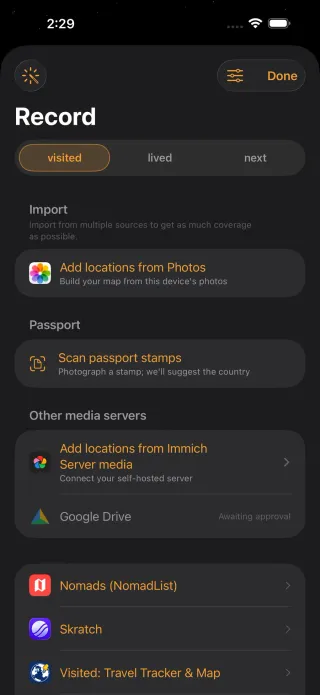
Turn supported photo locations and dates into mapped places without uploading the library to Mapsake.
Private travel journal
Mapsake can build a dated travel history from Photos and supported imports, group it into trips, and bring each journey back through names, notes, cover photos, place stories, On This Day memories, and Mapsake Rewind.
No account · No ads · No subscription
How it helps
A traditional journal starts empty. Mapsake begins with years of photo dates and locations, groups nearby visits into journeys, and lets you rename, annotate, split, merge, and illustrate each trip without uploading your history.
Turn supported photo locations and dates into mapped places without uploading the library to Mapsake.
Name a journey, add notes and dates, choose a local cover photo, and split or merge its stops whenever the automatic grouping needs your judgment.
Choose important discoveries, a weekly Atlas Digest, daily On This Day reminders, or no notifications at all.
Turn a trip into a polished vertical keepsake with its route, dates, cover, and a discreet Mapsake link.
Core travel data stays local-first, while Passport cards, reels, and read-only web maps are explicit choices.
Questions
No. Photos and supported imports can create the dated foundation; notes are optional when you want to add personal context.
Yes. Rename trips, adjust their dates, split one trip into two, or merge neighboring trips while keeping every stop.
Yes. Mapsake's JSON and HTML backups include trip membership, names, notes, dates, and compact cover images along with your places and settings.
No. Mapsake focuses on marked places, dated visits, photos, and imports rather than continuous background route recording.
No. Core use does not require an account, and your primary travel history remains on your device.
Mapsake is free on the App Store and keeps your core travel history under your control.
Download Mapsake